
Download Holded – Billing, Invoicing & Business Management Software
If you’re searching for a modern, all‑in‑one platform that can streamline invoicing, accounting, CRM, inventory and project management, Holded might be the answer. Designed as a SaaS solution, Holded promises a secure, cloud‑based environment where you can create professional invoices, monitor cash flow, and keep your whole team aligned—all from a single dashboard. In this review we’ll explore how Holded works, what makes it stand out, and whether it’s a good fit for startups, SMEs, or even larger enterprises.
Overview
Holded is a comprehensive business‑management suite that brings together invoicing, accounting, customer‑relationship management (CRM), inventory control, workforce planning and project tracking under one roof. The platform is built for small, medium and even larger businesses that need a scalable solution without the headache of juggling multiple disconnected tools. With a free basic tier and seven paid subscriptions, Holded lets you start without a financial commitment and upgrade as your needs evolve.
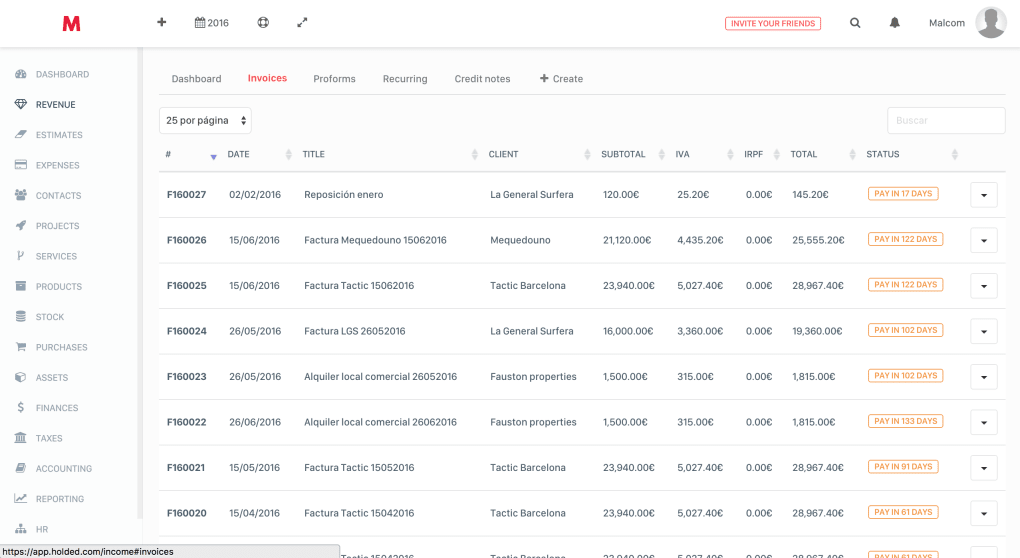
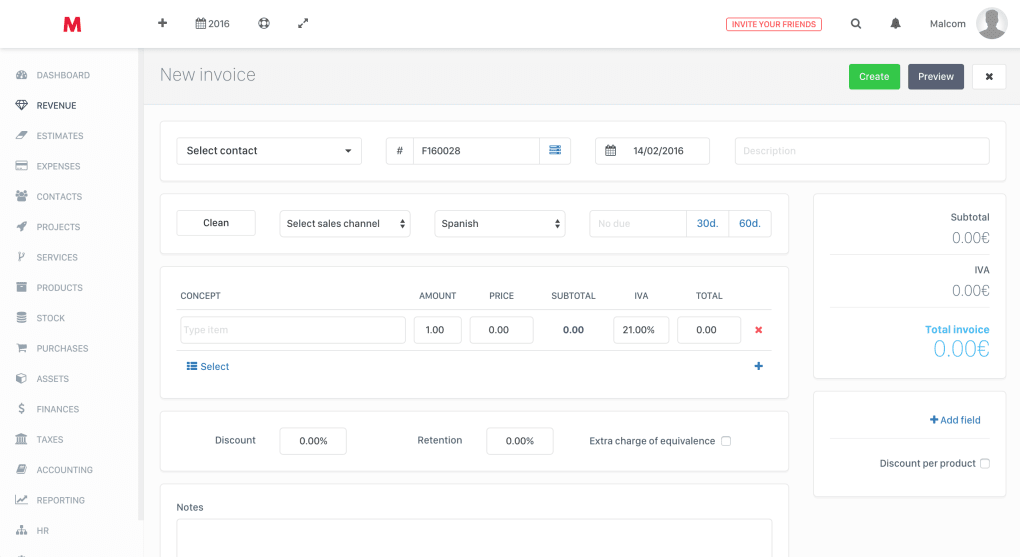
The core of Holded’s value proposition lies in its ability to generate custom invoice templates, automate recurring billing, and provide real‑time analytics that help you make data‑driven decisions. The app also features a built‑in billing portal where clients can view, download, and pay invoices online, reducing the friction of manual follow‑ups. Tax management is simplified through automated calculations and integrations with local tax authorities, while the accounting module offers customizable charts of accounts that reflect your industry’s specifics.
Overall, Holded positions itself as a “business operating system” that reduces administrative overhead, improves financial visibility, and supports growth.
Key Features
- Online Invoicing & Billing Portal: Create, send, and track invoices in seconds. Clients can pay directly through the portal using credit cards, PayPal or bank transfers.
- Recurring & Subscription Billing: Set up automated billing cycles for services, memberships or SaaS products, with flexible frequency options.
- Full‑Featured Accounting: Real‑time ledger, customizable chart of accounts, expense tracking, and automated tax calculations.
- CRM & Sales Pipeline: Manage leads, convert them into customers, and link sales activities directly to invoices for seamless revenue tracking.
- Inventory Management: Multi‑warehouse support, product variants, batch tracking, and automatic stock updates after each sale.
- Project & Workforce Management: Assign tasks, track time, and bill hours to specific projects or clients.
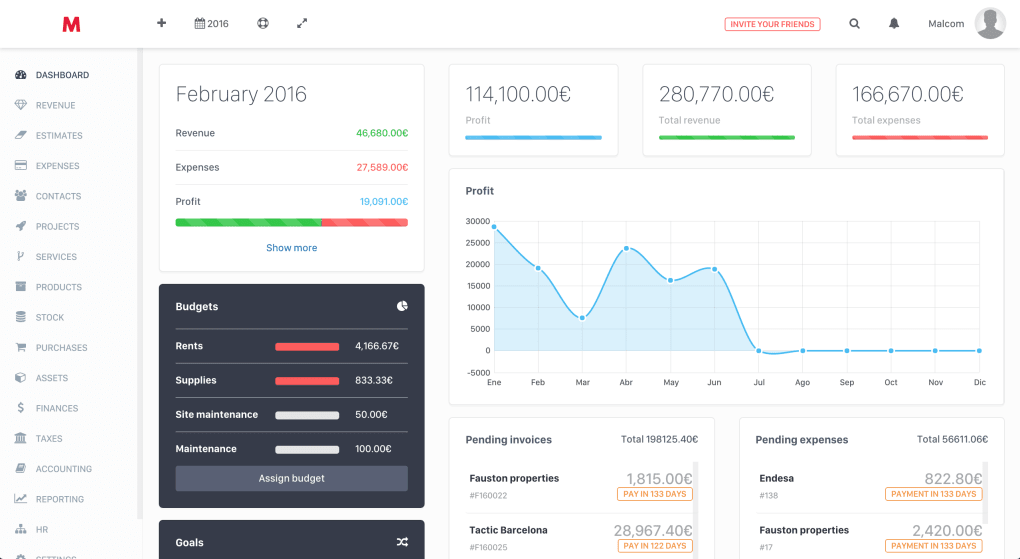
- Real‑Time Dashboards & Analytics: KPI widgets, profit‑margin analysis, cash‑flow forecasts, and customizable reports.
- Integrations & API: Connect with e‑commerce platforms like Shopify, PrestaShop, Magento, as well as popular tools such as Slack, Zapier, and Xero.
- Multi‑Currency & Multi‑Language Support: Ideal for businesses operating across borders.
- Secure Cloud Architecture: Data is encrypted at rest and in transit, with daily backups and GDPR compliance.
Installation & Compatibility
Holded is delivered as a cloud‑based SaaS application, which means there is no traditional “installation” process on your local machine. To get started, simply visit the official website, click the “Sign Up” button, and choose either the free tier or one of the paid plans. After confirming your email address, you’ll be guided through a quick onboarding wizard that helps you set up your company profile, tax settings, and preferred currency.
Because Holded runs in the browser, it is compatible with any modern operating system that supports up‑to‑date browsers. The official supported operating systems include Windows 10/11, macOS 12+, Linux distributions (Ubuntu, Fedora, etc.), iOS 13+ and Android 8+. The responsive design ensures a consistent experience whether you are on a desktop, laptop, tablet or smartphone. For power users, Holded also offers a native desktop client for Windows and macOS that provides offline caching and faster load times.
After logging in, the platform presents a clean, modular dashboard where you can pin the widgets most relevant to your daily workflow—such as “Unpaid Invoices,” “Cash‑Flow Forecast,” or “Open Projects.” Adding new users is straightforward; the admin can assign role‑based permissions (admin, accountant, sales, inventory manager) to ensure each team member sees only the data they need. For businesses that require deeper customization, Holded’s API allows developers to build custom integrations, automate data flows, or embed Holded functionality into an existing intranet.
Pros, Cons & Frequently Asked Questions
Pros
- All‑in‑one platform eliminates the need for multiple subscriptions.
- Intuitive UI makes onboarding fast even for non‑technical users.
- Robust recurring billing and subscription management.
- Real‑time analytics provide immediate insight into profitability.
- Extensive integrations with e‑commerce and third‑party tools.
- Secure cloud hosting with regular backups and GDPR compliance.
Cons
- Advanced accounting features (e.g., multi‑entity consolidation) are limited to higher‑tier plans.
- Customization of invoice templates requires some HTML/CSS knowledge for full branding control.
- Phone support is only available for premium plans; lower tiers rely on email and chat.
- While the UI is clean, power users may miss a few shortcut keys found in desktop‑only accounting software.
Frequently Asked Questions
Is Holded truly free for small businesses?
Yes, Holded offers a free tier that includes basic invoicing, unlimited contacts, and limited reporting. It’s a great way to test the platform before committing to a paid subscription.
Can I migrate data from another accounting system?
Holded provides CSV import tools for invoices, customers, products and chart of accounts. Additionally, the support team can assist with migrations from popular platforms like QuickBooks, Xero and Sage.
Does Holded support multiple currencies?
Yes, the platform allows you to issue invoices, record expenses and track cash flow in multiple currencies. Exchange rates are updated daily.
What security measures does Holded implement?
All data is encrypted both at rest and in transit using TLS 1.2+. Holded performs daily backups, offers two‑factor authentication, and complies with GDPR and ISO‑27001 standards.
Can I integrate Holded with my Shopify store?
Absolutely. Holded includes a native Shopify connector that syncs products, inventory levels and orders in real time, ensuring that sales data is reflected instantly in your accounting and invoicing modules.
Conclusion & Call to Action
Holded delivers on its promise of being a truly integrated business operating system. By unifying invoicing, accounting, CRM, inventory and project management, it cuts down on the administrative chaos that many growing companies experience. The cloud‑first approach guarantees that you can work from any device, and the extensive integration ecosystem means you won’t be locked into a single vendor. While the platform shines for most midsize firms, larger enterprises with complex consolidation needs may still need a dedicated ERP solution. If you’re ready to simplify your financial workflow, reduce manual data entry, and gain instant insight into profitability, give Holded a try today.
Start your free account now and experience a secure, feature‑rich environment that grows with your business.



.png)



